
Telangana Pensioners EHCT Form Self Submission వివరాలు update చేయాలంటే pensioner తప్పనిసరిగా officeకి వెళ్లాలా? అనే సందేహం చాలామందికి ఉంటుంది. వాస్తవానికి ఒకప్పుడు ఈ వివరాలు సమర్పించడానికి సంబంధిత అధికారుల చుట్టూ తిరగాల్సిన పరిస్థితి ఉండేది. కానీ ఇప్పుడు ఆ ఇబ్బంది లేకుండా, Telangana Pensioners EHCT Form Self Submission ద్వారా Pensioner మరియు వారి Family వివరాలను స్వయంగా onlineలో నమోదు చేసే అవకాశం అందుబాటులోకి వచ్చింది.
PPO ID, registered mobile number, family members వివరాలు, photos వంటి వాటిని ముందుగానే సిద్ధం చేసుకుంటే ఈ Telangana Pensioners EHCT Form Self Submission processను ఇంటి నుంచే పూర్తి చేయవచ్చు. Cashless ఆరోగ్య సేవలు పొందేందుకు అవసరమైన beneficiary/family detailsను update చేయడం కోసం ఈ Telangana Pensioners EHCT Form Self Submission విధానం ఎంతో ఉపయోగపడుతుంది. ఈ ఆర్టికల్లో IFMIS పోర్టల్ ద్వారా EHCT ఫార్మ్ ఎలా నింపాలో వివరంగా తెలుసుకుందాం.
IFMIS లో EHCT Form ఎలా open చేయాలి, PPO IDతో ఎలా login అవ్వాలి, OTP ఎలా verify చేయాలి, pensioner details ఎలా fill చేయాలి, family membersను ఎలా add చేయాలి, photos ఎలా upload చేయాలి, final submit చేసే ముందు ఏ విషయాలు check చేయాలి అనే వివరాలను ఒక్కొక్కటిగా తెలుసుకుందాం.
Telangana Pensioners EHCT Form Self Submission అంటే ఏమిటి
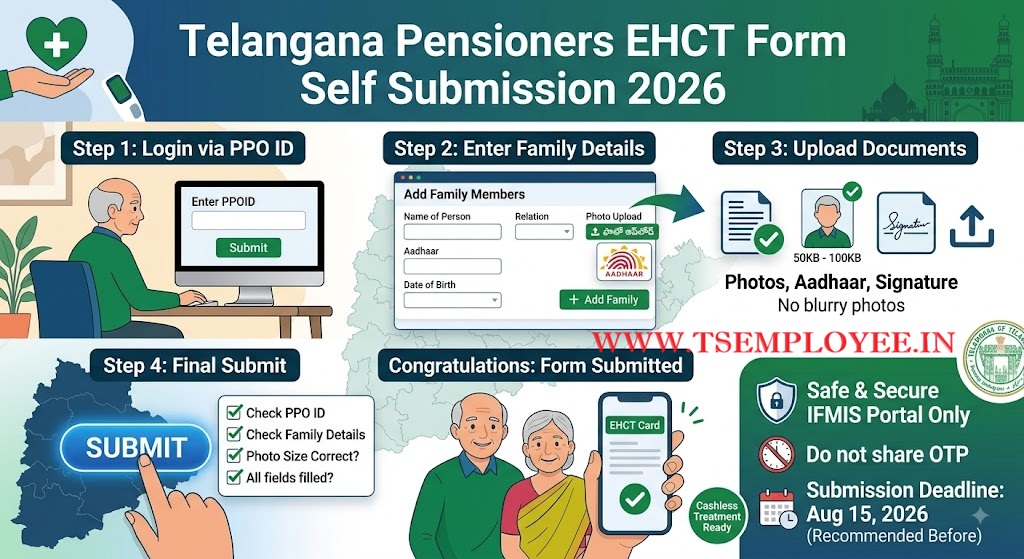
EHCT (Employee Health Care Trust) అనేది రాష్ట్ర ప్రభుత్వ ఉద్యోగులు మరియు పెన్షనర్లకు నగదు రహిత (cashless) ఆరోగ్య సేవలు అందించడానికి ఉద్దేశించిన పథకం. ఈ పథకం కింద లబ్ధి పొందాలంటే పెన్షనర్లు తమ తాజా వివరాలతో పాటు, తమ కుటుంబ సభ్యుల వివరాలను ప్రభుత్వానికి సమర్పించాల్సి ఉంటుంది.
ఇంతకుముందు ఈ ప్రక్రియ మాన్యువల్గా జరిగేది. కానీ ఇప్పుడు పారదర్శకత కోసం IFMIS (Integrated Financial Management and Information System) పెన్షన్ మాడ్యూల్లో ‘Self Submission’ ఆప్షన్ తీసుకువచ్చారు. దీని ద్వారా పెన్షనర్లు నేరుగా పోర్టల్లోకి లాగిన్ అయి, తమ సమాచారాన్ని సురక్షితంగా అప్డేట్ చేసుకోవచ్చు. కార్డు ద్వారా సేవలు అందించే EHS Hospitals మరియు network hospitals వివరాలను కూడా ముందుగానే తెలుసుకోవడం మంచి
EHCT Form Online Submission కు ముందుగా ఏం సిద్ధం చేసుకోవాలి?
ఈ ఫార్మ్ ఓపెన్ చేసి నింపడం ప్రారంభించడానికి ముందే, కింద పట్టికలో సూచించిన వివరాలను మీ దగ్గర సిద్ధంగా ఉంచుకోవడం ముఖ్యం.
| అవసరమైన వివరాలు | ఎందుకు అవసరం? |
| PPO ID |
Portalలో Login అవ్వడానికి మరియు verification కోసం. |
| Registered Mobile |
సిస్టమ్లో నమోదైన మీ నంబర్కు వచ్చే OTP కోసం. |
| Pensioner Photo |
Pensioner ప్రొఫైల్ అప్డేట్ చేయడానికి. |
| Family Photos |
స్కీమ్లో చేర్చాల్సిన కుటుంబ సభ్యుల గుర్తింపు కోసం. |
| Aadhaar Numbers |
కుటుంబ సభ్యులందరి identification కోసం. |
| Blood Group |
పెన్షనర్ మరియు కుటుంబ సభ్యుల ఆరోగ్య వివరాల కోసం. |
| Disability Details |
వైకల్యం ఉంటే ఆ సర్టిఫికెట్ మరియు శాతం (Percentage) వివరాల కోసం. |
| Address |
ప్రస్తుత మరియు శాశ్వత నివాస (Contact) వివరాల కోసం. |
💡Portalలో అడిగే PPO ID/నంబర్ను మీ pension recordsలో ఉన్న వివరాల ప్రకారం కచ్చితంగా నమోదు చేయండి. తప్పుగా నమోదు చేస్తే OTP రాదు.
Photo Upload చేయడానికి ముందు గుర్తుంచుకోవాల్సినవి
చాలామంది ఆన్లైన్ అప్లికేషన్లలో ఇబ్బంది పడేది ఫోటో అప్లోడ్ దగ్గరే. ఈ ఫీల్డ్ కనిపిస్తే ఏ ఆప్షన్ సెలెక్ట్ చేయాలో, ఫైల్ సైజ్ ఎంత ఉండాలో ముందే తెలుసుకుంటే పని సులభమవుతుంది.
-
ఫైల్ సైజ్ కచ్చితంగా 50 kb నుండి 100 kb మధ్యలోనే ఉండాలి.
-
ఫోటో ఫార్మాట్ JPG, JPEG, లేదా PNG లో మాత్రమే ఉండాలి.
-
ఫోటో స్పష్టంగా ఉండాలి. Blurry (మసకగా ఉన్న) ఫోటోలను అప్లోడ్ చేయకండి.
-
మీ మొబైల్ లేదా కంప్యూటర్లో ఫోటోలను సేవ్ చేసుకునేటప్పుడు ‘wife_photo.jpg’ లేదా ‘son_photo.jpg’ లాగా file names సింపుల్గా పెట్టుకోండి.
How to do Telangana Pensioners EHCT Form Self Submission ? (Step-by-Step Guide)
ముందుగా మీ మొబైల్ లేదా కంప్యూటర్ బ్రౌజర్లో తెలంగాణ IFMIS అధికారిక వెబ్సైట్ లింక్ను ఓపెన్ చేయండి: అధికారిక లింక్: https://ifmis.telangana.gov.in/pension/#/ehct_form
(గమనిక: ఈ లింక్ కేవలం పెన్షనర్ల సెల్ఫ్ సబ్మిషన్ కోసమే)
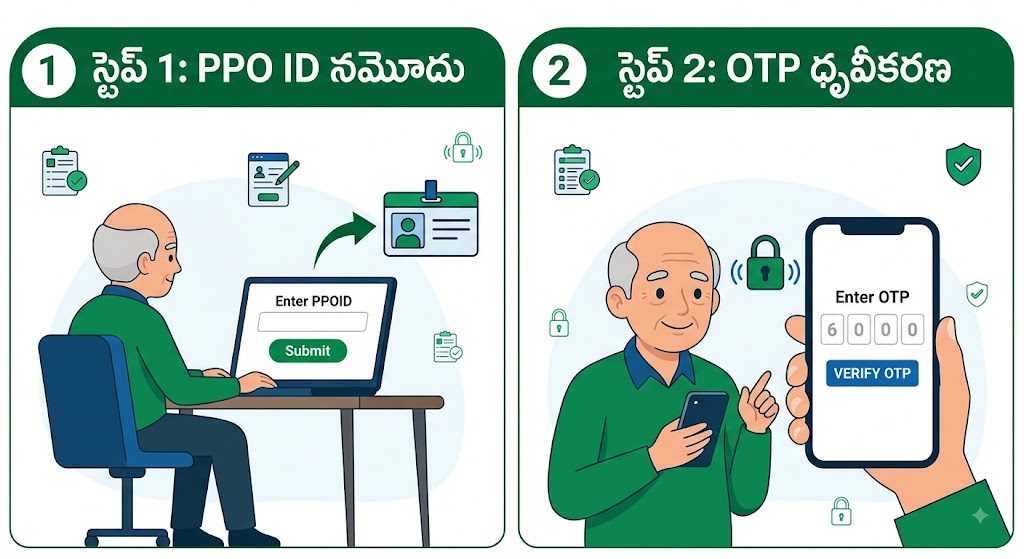
Step 1 – PPO ID ఎంటర్ చేసి లాగిన్ అవ్వడం ఎలా?
లింక్ ఓపెన్ చేయగానే స్క్రీన్ మీద “Enter PPOID” అనే గడి కనిపిస్తుంది. ఇక్కడ మీ PPO నంబర్ను ఎలాంటి తప్పులు లేకుండా ఎంటర్ చేసి, పక్కనే ఉన్న ఆకుపచ్చ రంగు ‘Submit’ బటన్పై క్లిక్ చేయాలి.
(Figure: IFMIS EHCT Form – PPO ID ద్వారా login చేసే విధానం)
Step 2 – రిజిస్టర్డ్ మొబైల్కు వచ్చే OTPని వెరిఫై చేయడం
Submit బటన్ నొక్కగానే మీ రిజిస్టర్డ్ మొబైల్ నంబర్కు OTP వస్తుంది.
-
“Enter OTP” అనే బాక్స్లో మీ మొబైల్కు వచ్చిన 6 అంకెల కోడ్ను నమోదు చేయండి.
-
ఆ తర్వాత నీలం రంగులో ఉన్న “VERIFY OTP” బటన్ మీద క్లిక్ చేయండి.
(Figure: IFMIS EHCT Form – OTP screen)
Step 3 – Pensioner Basic Details Check చేయడం
OTP వెరిఫై అయిన తర్వాత, Pensioner డ్యాష్బోర్డ్ ఓపెన్ అవుతుంది. ఇక్కడ మీ పేరు, Status, Employee Code, Pension Type మరియు PPO ID వంటివి సిస్టమ్ ద్వారా defaultగా కనిపిస్తాయి. ఎడమవైపు ఉన్న ప్రొఫైల్ సింబల్ మీద క్లిక్ చేసి మీ పాస్పోర్ట్ సైజ్ ఫోటోను అప్లోడ్ చేయాలి.
Step 4 – Pension Details ఎలా Fill చేయాలి?
స్క్రీన్లో ఎడమవైపున ఉన్న ఈ విభాగంలో మీ వ్యక్తిగత వివరాలను నమోదు చేయాలి:
-
Gender (లింగం): 1- MALE, 2- FEMALE, 3- OTHER ఆప్షన్ల నుండి ఎంచుకోండి.
-
Marital Status: 1- Married, 2- Un Married, 3- Divorced, 4- Widowed నుండి ఎంచుకోండి.
-
Disability: మీకు వైకల్యం ఉంటే ‘Yes’ అని సెలెక్ట్ చేసి, Disability percentage (0-100) మరియు Disability Description (సర్టిఫికెట్లో ఉన్నట్లుగా) నమోదు చేయాలి. లేకపోతే ‘No’ ఎంచుకోండి.
-
Community: మీ సామాజిక వర్గాన్ని (SC, OC, ST, BC-A మొదలైనవి) జాబితా నుండి ఎంచుకోండి.
-
Blood Group: మీ బ్లడ్ గ్రూప్ (A+, B+, O- వగైరా) ఎంచుకోండి.
-
Last Designation & Head of Department: మీరు పదవీ విరమణ పొందేనాటికి ఏ హోదాలో, ఏ డిపార్ట్మెంట్లో పనిచేశారో ఆ వివరాలు టైప్ చేయండి.
Step 5 – Contact Details ఎలా Fill చేయాలి?
కుడి వైపున ఉన్న ‘Contact Details’ సెక్షన్లో మీ చిరునామా వివరాలు ఇవ్వాలి:
-
Phone & Email: మీ ప్రస్తుత మొబైల్ నంబర్ మరియు ఈమెయిల్ ఐడీని నమోదు చేయండి.
-
Address & Permanent Address: ప్రస్తుతం ఉంటున్న పూర్తి చిరునామాను మరియు శాశ్వత చిరునామాను టైప్ చేయండి.
-
House Number & Street Name: ఇంటి నంబర్ మరియు వీధి పేరును విడివిడిగా ఇవ్వాలి.
-
State & District: రాష్ట్రం మరియు జిల్లాను ఎంచుకోండి.
-
Area Type: మీరు నివసించే ప్రాంతం Mandal పరిధిలో ఉందా లేదా Municipality పరిధిలో ఉందా అనేది ఎంచుకుని, సంబంధిత గ్రామం లేదా వార్డును ఎంచుకోవాలి.
How to Add Family Members in Telangana Pensioners EHCT Form? (కుటుంబ సభ్యుల వివరాలు చేర్చడం ఎలా?)
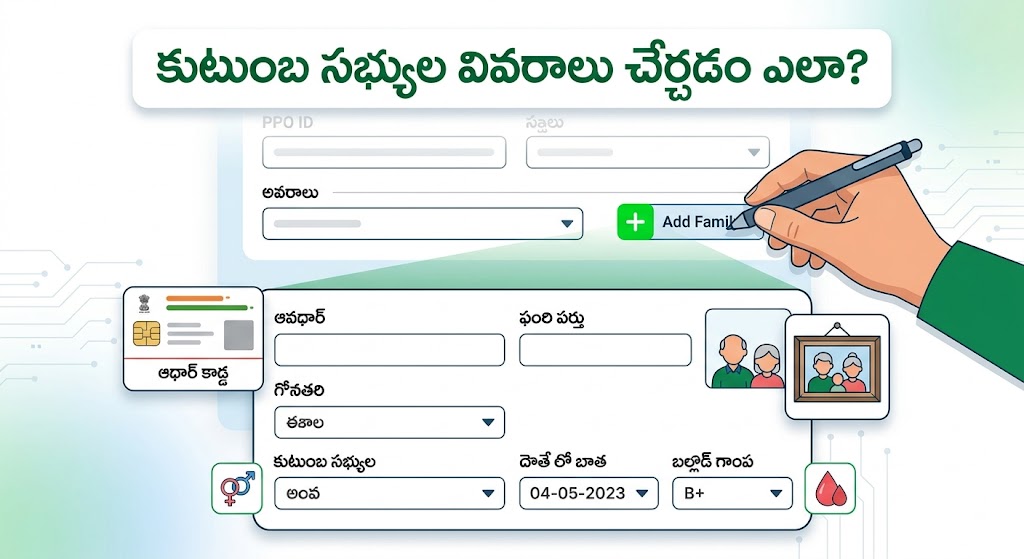
EHCT కార్డు ద్వారా మీ కుటుంబానికి వైద్యం అందాలంటే ఇక్కడ వివరాలు తప్పులు లేకుండా ఇవ్వాలి. పేజీలో కిందకు వస్తే “Employee Family Details” అనే ఆప్షన్ కనిపిస్తుంది.
-
కుడి పక్కన ఉన్న “+ Add Family” బటన్ మీద క్లిక్ చేయండి.
-
Name of Person: కుటుంబ సభ్యుని పేరు ఆధార్ లో ఉన్నట్లుగా రాయండి.
-
Relation: వారు మీకు ఏమవుతారో (Wife, Husband, Son, Daughter వగైరా) ఎంచుకోండి.
-
Gender & DOB: లింగం మరియు పుట్టిన తేదీ ఎంచుకోండి.
-
Occupation: వారి వృత్తిని ఎంచుకోండి.
-
Aadhaar: వారి 12 అంకెల ఆధార్ నంబర్ను జాగ్రత్తగా ఎంటర్ చేయండి.
-
Is Dependent: వారు ఆర్థికంగా మీపై ఆధారపడి ఉన్నారా (Yes/No) అనేది ఎంచుకోండి. (ఉదాహరణకు: గృహిణి అయిన భార్య, చదువుకునే పిల్లలు మీపై ఆధారపడినట్లే. సొంతంగా ఉద్యోగం చేస్తున్న పిల్లలు ఆధారపడినట్టు కాదు).
-
Disability & Blood Group: వైకల్యం ఉంటే వివరాలు ఇచ్చి, వారి రక్తపు గ్రూపును ఎంచుకోండి.
-
Photo Upload: వారి ఫోటోను ‘Browse’ క్లిక్ చేసి అప్లోడ్ చేయండి.
-
SAVE: వివరాలు నింపాక కింద ఉన్న ‘SAVE’ బటన్ నొక్కండి.
(ఇదే విధంగా మిగతా కుటుంబ సభ్యులను కూడా “+ Add Family” నొక్కి యాడ్ చేసుకోవచ్చు).
Final Submit చేసే ముందు ఒక్కసారి చెక్ చేసుకోండి
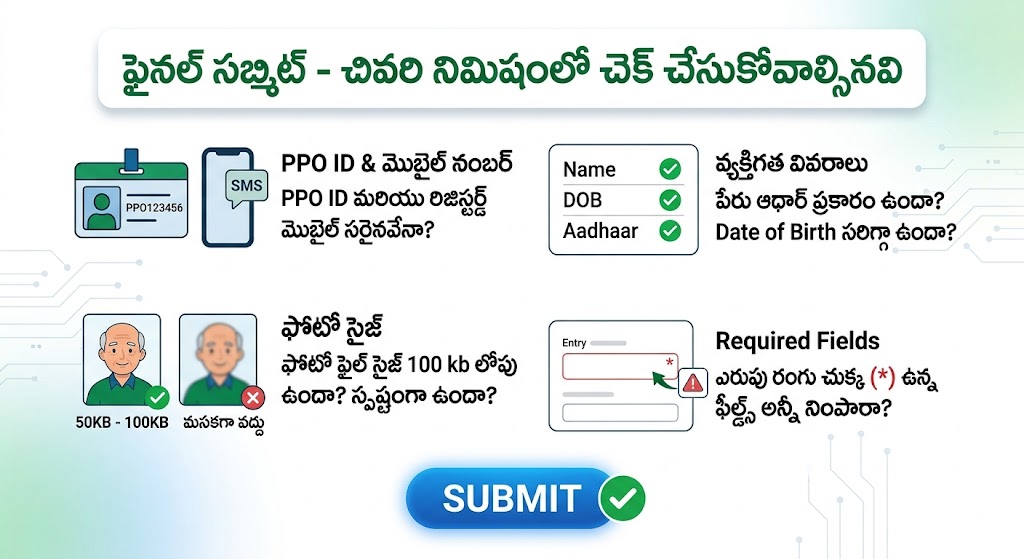
కుటుంబ సభ్యుల వివరాలు సేవ్ చేయగానే, అవన్నీ ఒక పట్టిక (Table) రూపంలో కింద కనిపిస్తాయి. తప్పులు ఉంటే ‘Edit’ బటన్ నొక్కి సరిచేసుకోండి. సబ్మిట్ కొట్టే ముందు ఈ క్రిందివి నిర్ధారించుకోండి:
-
Submit buttonపై click చేయడానికి ముందు ఈ checklistను ఒకసారి చూడండి:
☑ PPO ID సరైనదేనా?
☑ Pensioner name సరిగ్గా ఉందా?
☑ Mobile number సరైనదేనా?
☑ Pension details సరైనవేనా?
☑ Address వివరాలు సరిగ్గా ఉన్నాయా?
☑ Family member namesలో spelling mistakes లేవా?
☑ Aadhaar numbers correctగా ఉన్నాయా?
☑ Date of Birth సరైనదేనా?
☑ Blood Group సరైనదేనా?
☑ Dependency status సరిగ్గా select చేశారా?
☑ Photos clearగా ఉన్నాయా?
☑ Photo file size portal requirementకు సరిపోతుందా?
☑ Required fields అన్నీ complete చేశారా?
అన్నీ కరెక్ట్గా ఉన్నాయని నిర్ధారించుకున్న తర్వాత మాత్రమే, పేజీ అడుగున ఉన్న నీలం రంగు “Submit” బటన్ క్లిక్ చేయండి.
Telangana Pensioners EHCT Form Self Submission Submit కావడం లేదంటే ఏం చేయాలి?
-
OTP రావడం లేదు: సర్వర్ బిజీ వల్ల కాస్త ఆలస్యం కావచ్చు. నెట్వర్క్ చెక్ చేసుకుని 2 నిమిషాలు ఆగి మళ్లీ ప్రయత్నించండి.
-
Photo upload కావడం లేదు: సైజ్ ఖచ్చితంగా 100 kb కన్నా తక్కువ ఉండేలా చూసుకోండి.
-
Submit button పనిచేయడం లేదు: ఫార్మ్లో ఎరుపు రంగు చుక్క (*) ఉన్న ఫీల్డ్స్ ఏమైనా వదిలేశారేమో గమనించండి. అవన్నీ నింపితేనే సబ్మిట్ అవుతుంది.
- EHCT Form successfully submit చేసిన తర్వాత మీ Pensioner Health Cardను onlineలో download చేసుకోవచ్చు. Health Card download చేసే పూర్తి విధానం కోసం Telangana Pensioners Health Card Download 2026 guide చూడండి.
ఈ విధంగా మీరు సులభంగా Telangana Pensioners EHCT Form Self Submission పూర్తి చేయవచ్చు
🔒 భద్రతా సూచన (Safety Note): ఆగస్టు 15వ తేదీ దగ్గర పడుతుండటంతో కొందరు సైబర్ నేరగాళ్లు నకిలీ లింక్స్ పంపే అవకాశం ఉంది. ఆధార్ మరియు OTP లాంటి సున్నితమైన వివరాలు నమోదు చేసేటప్పుడు వాట్సాప్లో వచ్చే Unofficial లింక్స్ ఓపెన్ చేయకండి. కేవలం IFMIS అధికారిక వెబ్సైట్ ద్వారానే వివరాలు నమోదు చేయండి. మీ OTP ఎవరికీ చెప్పకండి.
Frequently Asked Questions – Telangana Pensioners EHCT Form Self Submission
EHCT Form Self Submissionకు చివరి తేదీ ఎప్పుడు?
తెలంగాణ పెన్షనర్లు ఆన్లైన్ ద్వారా Telangana Pensioners EHCT Form Self Submission చేయడానికి ఆగస్టు 15, 2026 చివరి తేదీగా నిర్ణయించబడింది.
EHCT Form అంటే ఏమిటి?
EHCT అంటే Employee Health Care Trust. ఈ formలో pensioner మరియు family memberలకు సంబంధించిన అవసరమైన వివరాలను నమోదు చేయాల్సి ఉంటుంది.
EHCT Form submit చేయడానికి PPO ID అవసరమా?
మీ source ప్రకారం Telangana Pensioners EHCT Form Self Submission లో PPO ID ద్వారా verification/login process ప్రారంభమవుతుంది.
OTP ఏ mobile numberకు వస్తుంది?
మీ source ప్రకారం PPO IDకి సంబంధించిన registered mobile numberకు OTP వస్తుంది. పాత mobile number activeగా లేకపోతే సంబంధిత recordsలో mobile number update అవసరం కావచ్చు.
EHCT Form photo size ఎంత ఉండాలి?
మీరు అందించిన portal details ప్రకారం photo 50 KB నుంచి 100 KB మధ్యలో ఉండాలి మరియు JPG/JPEG/PNG formatsలో ఉండాలి. Upload fieldలో portal చూపించే current requirementను finalగా follow చేయండి.
Family member Aadhaar number తప్పుగా enter చేస్తే?
Final submissionకు ముందు family details tableలో Edit option కనిపిస్తే దాని ద్వారా తప్పును సరిచేయండి. Submit చేసే ముందు తప్పనిసరిగా verify చేయండి.
Mobile phoneలో EHCT Form fill చేయవచ్చా?
మీ source ప్రకారం mobile ద్వారా కూడా form fill చేయవచ్చు. అయితే family members ఎక్కువగా ఉన్నప్పుడు laptop లేదా computerలో typing మరియు photo upload కొంత సులభంగా ఉండవచ్చు.
Officeకి వెళ్లకుండా EHCT Form submit చేయవచ్చా?
ఈ Self Submission process యొక్క ఉద్దేశ్యమే onlineలో details నమోదు చేయడం. అవసరమైన information మరియు photos సిద్ధంగా ఉంటే IFMIS portal ద్వారా self submission చేయవచ్చు.
Telangana Pensioners EHCT Form Self Submission మొదటిసారి చూస్తే కొంచెం పెద్ద processలా అనిపించవచ్చు. కానీ PPO ID, registered mobile, photos, Aadhaar మరియు family details ముందుగానే సిద్ధంగా ఉంచుకుంటే ఒక్కో sectionను క్రమంగా complete చేయవచ్చు. Telangana Pensioners EHCT Form Self Submission పూర్తి చేసే ముందు మొత్తం formను మరోసారి పరిశీలించి, అన్ని వివరాలు సరిగ్గా ఉన్నాయని నిర్ధారించుకున్న తర్వాతే final Submit చేయండి.
ముఖ్యంగా family member details మరియు Aadhaar numbers enter చేసేటప్పుడు తొందరపడకుండా verify చేయండి. అలాగే photo upload సమయంలో file size మరియు formatను ముందుగానే check చేసుకుంటే unnecessary errors తగ్గుతాయి.
Telangana Pensioners EHCT Form Self Submission పూర్తి చేసే ముందు మొత్తం formను మరోసారి పరిశీలించి, అన్ని వివరాలు సరిగ్గా ఉన్నాయని నిర్ధారించుకున్న తర్వాతే final Submit చేయండి.
August 15, 2026 deadline మీకు వర్తిస్తే, చివరి రోజు వరకు వేచి ఉండకుండా ముందుగానే process పూర్తి చేయడం మంచిది.
Is there any edit option avaiable after submission?
How to update registered mobile number
After entering my wife particulars click save botton, one screen cameout for enter name row 1. I have all columns correctly but not saving the file. Please explain clearly.
Proof Document is @ADHAR CARD OR AG PPO COPY?
I am a family pensioner and no dependants, I did not submit my details for EHS 2026 health card before August 15th. Can I submit later and will be entitled for the scheme?
Sir please take note that while filling in EHS application there is no column with regard to death of wife or spouse. This has to be provided.
This cite is working very good .it has given to change phone number also
I am submitting is successfully.but photo before upload clarity and after submitting it is eyes below is appearing. What can we do to edit or re submit photo .
Sir. I have successfully completed my form but my uploaded photo though it is within the limit appearing only half face. How to edit it. What to do?
I’m service pensioner,Iam having a dependent son whose age is 35 years .as he was under gone brain tumor cancer surgery few years back nd given radiation at that time .now he is not in a position to feed himself . My doubt is can I add my son as dependent for health card .so pls answer my doubt .
How to correct dob for dependent in the form? DOB field cannot be updated. Can we submit with existing data and get the dob corrected later?
Very useful submitted successfully from mobile
I have no Health Card from the beginning
Incase of family pension, how to fill the detials
IF THERE ARE NO DEPENDENTS FOR SERVICE PENSIONER WHAT CAN WE DO?
SYSTEM ASKING PLEASE ENTER NAME FOR FAMILY MEMBER ROW 1
Not coming otp
Not coming otp
Useful information, myself submitted successfully
How to edit depends or death candidate data
I submitted details of my wife correctly 25 years ago as nominee. How to verify the same, I am unable to get it in IFIMIS
I am not getting otp
Is there any age restrictions for the family members to avail this EHCT Fecility
I have submitted my EHS form on line,but it is not showing the download of my EHS card,from where I will get my EHS card.
Submit Not working
I have clicked the submit button instead uploading one eligible family member. How can I upload this again. Any solution please?
Can I get this link from IFMIS in iPhone? Pl clarify. If mine is iPhone, how can I download the form.
I am tired by trying to complete the process. But every time after pressing save button I get the message to enter name for row 1.Row was not created by me. It is in built. It canot be remived. I am in confusion. I want solution for my problem pl.
Sir my register mobile number is 9959924207 but shown worang mobile no is 995994027, but how it record which portal
I am only person eligible
I have 2 son’s and one daughter
above 30 years married
Can I upload all family members as dependents
August 15, 2026 deadline మీకు వర్తిస్తే,15 వ తేది లోపు చేసుకోమని ఇచ్చారు, అంటే ఇది ఎవరికి, ఇంతకుముందు చేసుకున్నాము కదా, నేను family pensioner ని, dependents ఎవరు లేరు. నాకు వర్తిస్తుందా
I am already downloaded the new health card can I resubmit the form
My father retired as primary school head master,which department have to choose
Early reply requested
I am only the person eligible for the scheme. Is it useful to me or not?
I have filled up my proforma.I have added my wife’s name,her details including taking of her photo.When I pressed the button “save”,instead of saving,it is again saying
“Write the relationship against row no.1”
o spite of my writing the relationship as “wife”.
I have repeated again the entire process including taking my wife’s photo & pressed the button “SAVE”,it is again repeating the words”write the relationship against row no.1.
Any one please suggest what to do next.
I have a problem with IFMIS portal. When I entered my PPOID, Otp goes to unknown phone number. How could it be rectified, can know me the procedure. Now I am unable to to login into IFMIS in to IFMIS
Presently at US unable to come India before last date i.e., 15th August 2026 and not getting OTP in registered mobile in US. What is the way out?
We are in US, not getting OTP to open IFMIS, unable to come India before last date I.e.,15th August 2026. What is the way out?
After Successful submission the officials will send messages for confirming the same ?
While entering family member details and save error is showing asking to name in first row , though it is filled. Request jelp
I lost my wife, A. Meenakshi in 27/1/2008. She’s expired. Her Aadhar card not available. My two children not eligible, as they are not dependent on me. I have filled all my details. When I tried to submit, it’s asking wife’s aadhar number. హ w can I give, when she’s expired. I tried to submit. Not accepting
Last date August 15. What should I do
🤝💐సో ఫైన్ very good 👍 Use full
After entering family detailsand after pressing the save button “enter name for row 1″message is being displayed every time and the process is not being completed even after trying many times.
Sir how to mobile no create for health cards
నా సమాచారం లో అడ్రస్ తప్పుగా నింపడం జరిగింది.
ఫైనల్ సబ్మిషన్ చేయడం జరిగింది. నా అడ్రస్ సరిచేసుకునే అవకాశం ఉందా ?
Very good & useful information circulated. Thank you very much by Vaddepally Sadanandam
I have facing problem in uploading the details and photos
After all formalities when press submit button, the sentence coming is
Pl. Select relationship for row 1
Appearing, even after relationship entered.
The site not opened properly
I am pentioner
I have to submit form compulsory
Good easy understanding , helpful
What is user name and password in ifmis ?
it is very informative
If there is a mistake found after submitting,can we edit once again
I have no Health card from the beginning
How to update my health card(EHCT).
Very valuable and useful information but time is too short, only few days left. Seems servers are very busy.
By mistake filled wrong address how to correct after final submission